Free welcome book builder
Create a Free Vacation Rental Welcome Book Without Design Skills
Instead of downloading a blank Word, Canva, or PDF template, enter your property information in structured fields and StayPerk formats the guest manual for you. Preview the result, download a printable PDF, or share the digital version with guests.
Not just a blank template
Enter the information. StayPerk formats the manual.
A downloadable template can be a useful starting point, but it still leaves the page design and file maintenance to you. StayPerk turns the template into a guided builder.
With a traditional blank file
Design pages and decide where every section belongs.
Align text, move images, and keep page breaks readable.
Export and maintain separate print and digital files.
With the StayPerk builder
Fill in structured guest-information sections.
Attach reusable photos and add short video help.
Preview mobile and printable versions from the same manual.
Step by step
How to create your free manual
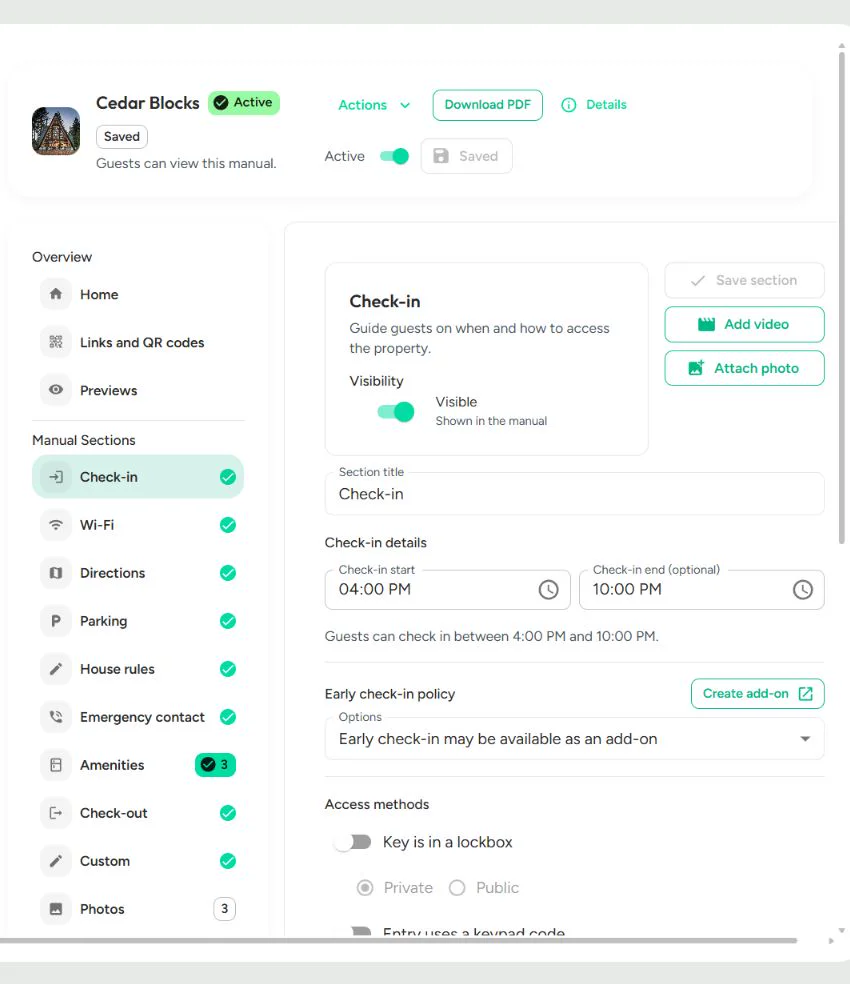
The workflow below follows the current production product, including the controls you will see after you add a property.
Step 1
Start your manual
Answer a few guided questions and begin building immediately. No account is needed to start, and your draft stays on this device while you work.
Step 2
Add your property details
Enter the property name plus guest information such as check-in, Wi-Fi, directions, parking, house rules, emergency contacts, amenities, and checkout.
Step 3
Review your draft
Review your answers and open the sample preview to see how the guest information is taking shape before you decide to keep it.
Step 4
Save your manual
When you are ready to keep the draft, create your free account or sign in. StayPerk securely imports the draft into the production manual editor.
Step 5
Add photos, videos, and QR codes
After saving, use the full editor to attach reusable photos, add short video help, generate a Wi-Fi QR code, and create an in-property QR for manual access.
Step 6
Download, print, or share
Preview the saved manual in Mobile or Letter view, download a PDF or print it, and publish when you are ready to share the public guest link or access QR.
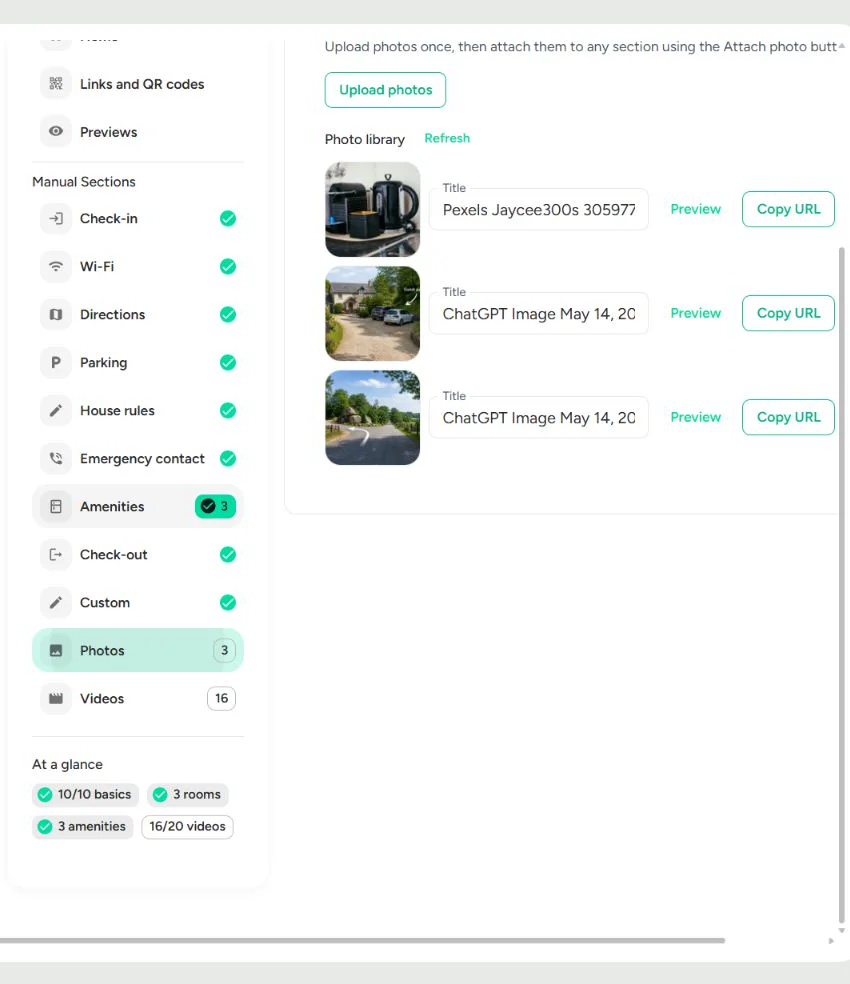
Photos and videos support the instructions
The photo library keeps images reusable across the manual. The video library supports short clips, prepares them for mobile playback, and lets you decide which clips appear in the guest manual.
Structured content
What you can include
StayPerk keeps common house-manual information in dedicated sections, so you can maintain the content without manually laying out individual document pages.
Check-in instructions and access methods
Wi-Fi details, troubleshooting, and a Wi-Fi QR code
Directions and parking information
House rules and guest expectations
Emergency contact and safety guidance
Amenities organized by room or area
Check-out time, policy, and checklist
Custom text, links, photos, and short videos
One manual, two useful formats
Printable when guests need paper. Digital when details change.
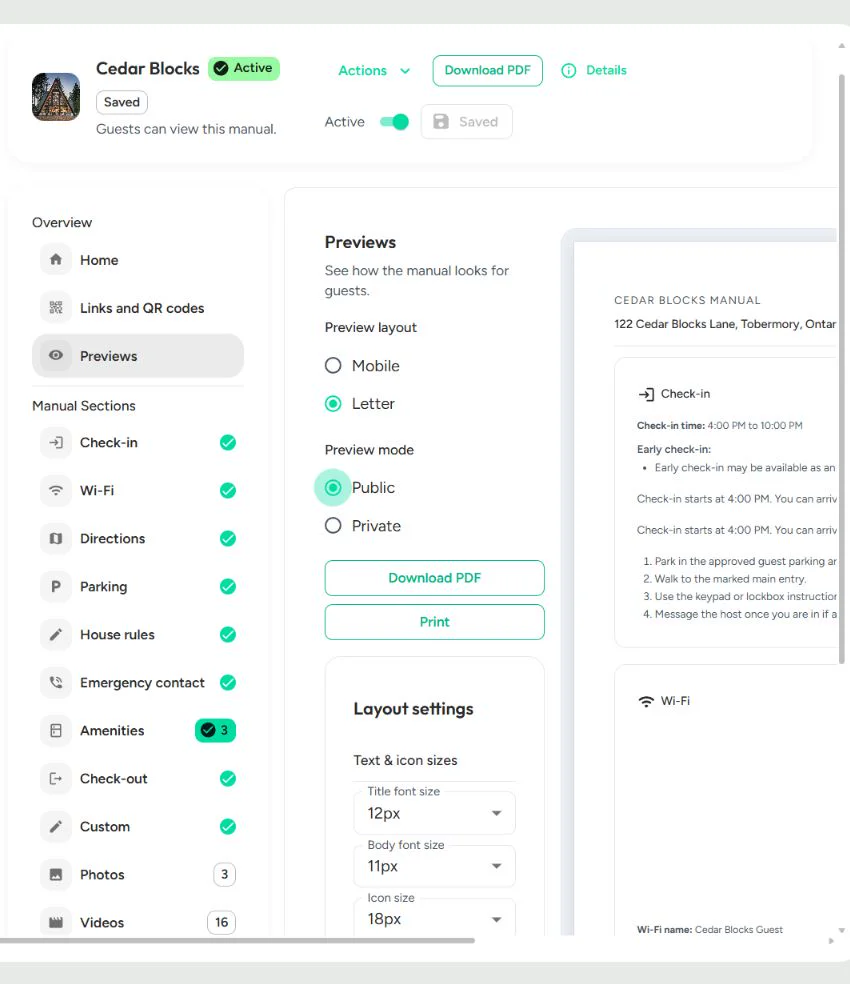
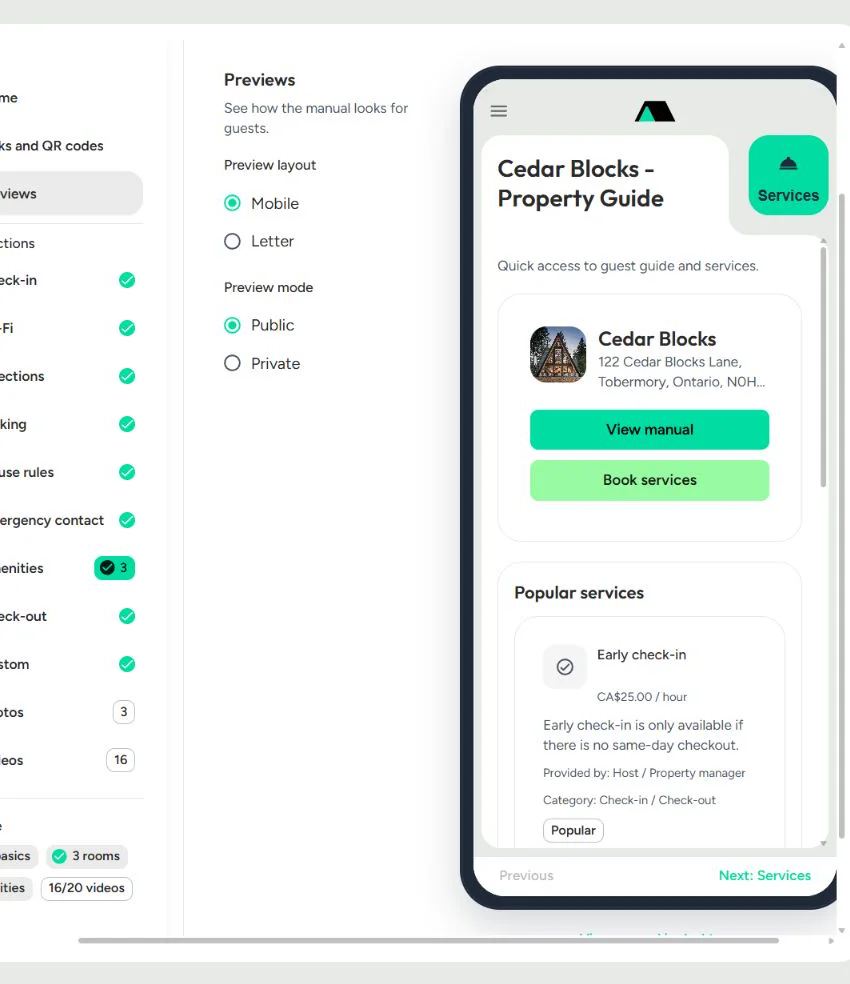
The editor uses the same structured manual for a phone-friendly guest view and a printable Letter layout. Review public or private content before you share either version.
Printable manual
Open the Letter preview and choose Public or Private mode.
Adjust supported text, icon, image, and margin settings.
Download the prepared PDF or open the browser print flow.
Digital manual
Share the public guest link before or during the stay.
Place the in-property QR where guests can scan it.
Update the underlying manual without creating a new static file.
Current customization
A formatted design, with focused layout controls
StayPerk currently has one primary manual design. It does not offer a gallery of visual themes, and this page does not advertise multiple templates.
Focus on the property, not page design
The layout is already formatted around the structured sections.
Letter view supports title, body, and icon sizing.
Image size and page margins can be adjusted.
Your content, section titles, photos, and videos personalize the manual.
Workflow comparison
Why this is different from a downloadable template
Both approaches can produce a useful welcome book. The difference is whether you want to format and maintain the document yourself or work from a structured manual builder.
Traditional downloadable template vs StayPerk manual builder
| Workflow | StayPerk manual builder | Traditional downloadable template |
|---|---|---|
| Starting point | Structured fields for the guest information a property manual needs. | A blank or sample document that you replace and arrange yourself. |
| Formatting | A generated, already-formatted manual layout. | Manual page design, alignment, spacing, and image placement. |
| Guest formats | Mobile guest view plus a printable Letter preview and PDF. | Usually one static file or a separate digital version you maintain. |
| Updates | Edit the underlying manual; the guest link continues to open it. | Edit, export, resend, and replace the old document. |
| Sharing | Built-in public link, private access code, and in-property QR workflow. | You create and maintain the file-sharing or QR setup separately. |
| Video | Short videos can appear in the digital manual. | Paper cannot play video; a static file needs separate video links. |
Free manual tools
Create and share the manual without a monthly subscription
StayPerk's current pricing lists property manuals and manual or guest QR codes among the free host tools. StayPerk earns money when a supported paid transaction happens, not from a monthly manual-builder subscription.
Start with the guest information you already have.
There is no need to choose a theme or prepare a separate design file before you begin. Review the full model on the pricing page.
Keep exploring
Related StayPerk pages
Use these pages to understand the product, verify current pricing, see the guest experience, and plan the information that belongs in your manual.
vacation rental welcome book guide
Learn what a welcome book is, what belongs in it, and why a digital guide is easier to maintain.
digital guest manual builder
Review StayPerk's mobile manual, video, QR sharing, add-on, and service workflow.
StayPerk for vacation rental hosts
See how manuals, guest add-ons, services, and host workflows fit together.
free tools and transaction pricing
Verify the current free-to-use model and supported transaction economics.
view the sample digital manual
Open a real guest-facing StayPerk manual in the browser.
vacation rental guest manual sections
Use the practical section checklist for arrival, safety, house details, and checkout.
digital guest manual vs PDF welcome book
Compare updateability, mobile access, privacy, and print workflows.
StayPerk resources
Read practical guides for guest manuals, add-ons, service revenue, and public claims.
Already have a manual? We'll convert it for free
Send an existing manual file or link without creating an account.
Frequently asked questions
Short answers related to this resource.
Is the vacation rental welcome book template really free?
Yes. StayPerk lists property manuals and manual or guest QR codes among its free host tools. There is no monthly subscription for creating and sharing the manual; StayPerk earns money when supported paid transactions occur.
Can I download the welcome book as a PDF?
Yes. Open the Letter preview, choose the public or private version you need, and use Download PDF after StayPerk prepares the file.
Can I print the manual?
Yes. The Letter preview includes a Print action that opens the browser print flow for the generated manual.
Can guests view the manual online?
Yes. Guests can open the digital manual from the public guest link or scan the in-property QR code. Private fields can require the saved four-digit access code.
Can I add photos and videos?
Yes. Upload photos to the reusable photo library and attach them to sections. The video library accepts short videos and prepares them for mobile guest playback.
Can I add a Wi-Fi QR code?
Yes. The Wi-Fi section generates a QR code from the saved network details and supports downloadable QR files with design controls.
Can I customize the design?
StayPerk currently uses one primary formatted manual design. In the Letter preview you can adjust title, body, and icon sizes, image size, and page margins, while your property photos and content personalize the result.
Do I need an account, Canva, or Word to start?
No. Start building the manual without an account or design software. StayPerk formats the information you enter, and you create a free account only when you are ready to save the draft.
Can I update the manual later?
Yes. Return to the structured editor, update the relevant section, and save the manual. The shared digital link continues to point to the manual; create a fresh PDF when you need an updated printed copy.
Can I use it for an Airbnb or another short-term rental?
Yes. The builder is designed for vacation rentals and other short-term stays. StayPerk is an independent product and is not affiliated with or endorsed by Airbnb.